camus-cli
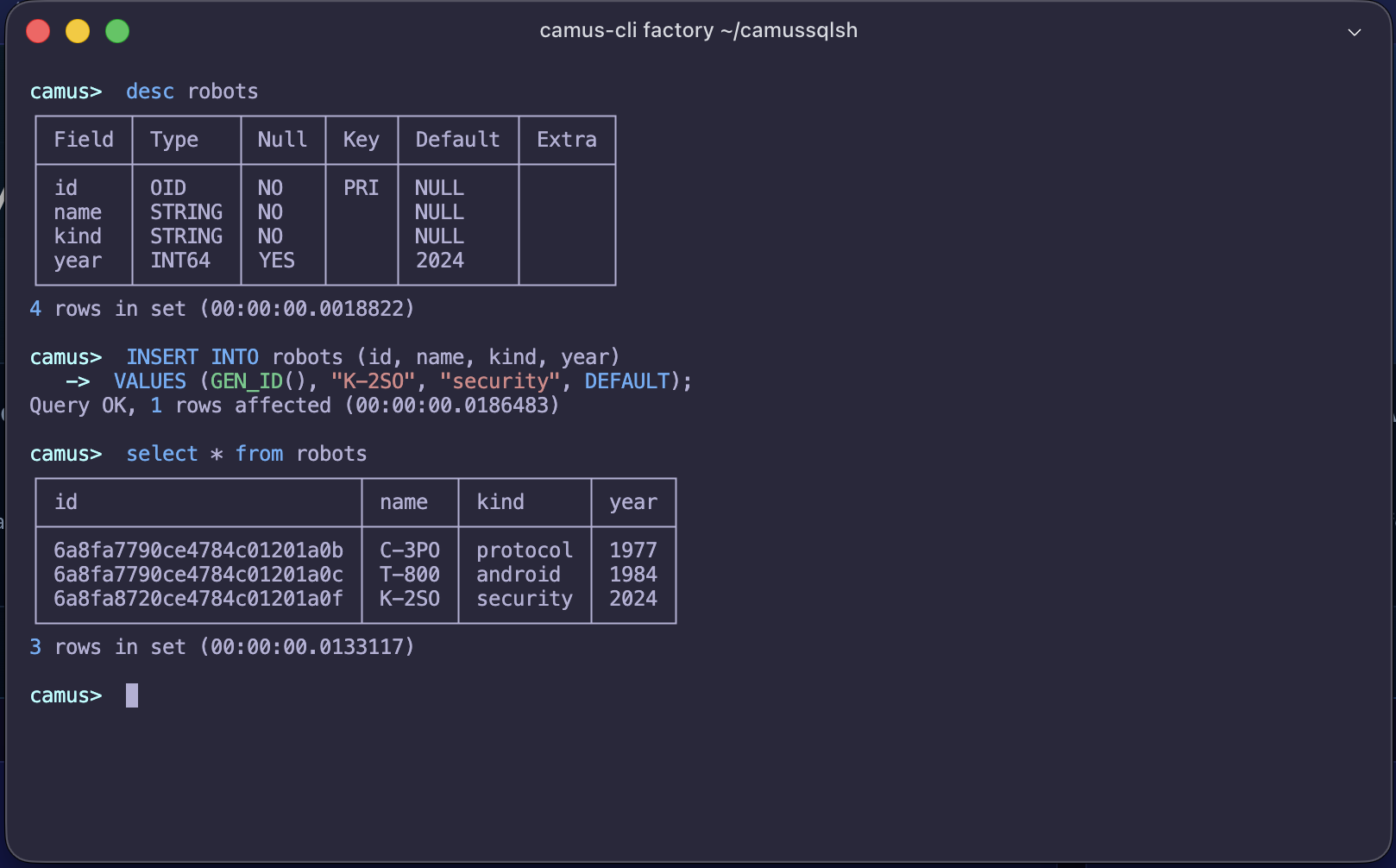
camus-cli is the command-line SQL shell for CamusDB. It gives you these
features:
- an interactive SQL prompt
- a full-screen mode with catalog, editor, and result panes
- multiline editing
- syntax highlighting
- Tab autocompletion
- command history
- transaction commands
- SQL script execution
- non-interactive SQL execution with
-e, and whole-file execution with-f - database switching
- vertical query output for wide rows
- prepared-statement inspection
- backup administration
- built-in workload helpers
Install
Install the global tool:
dotnet tool install --global CamusDB.SqlSh
Update it:
dotnet tool update --global CamusDB.SqlSh
The tool installs an executable with this name:
camus-cli
Basic usage
Start the shell with defaults:
camus-cli
Without a connection string, the shell tries the local listener of gRPC first. It then falls back to the local listener of REST:
Endpoint=http://localhost:5096;Database=<database>;Protocol=grpc
Endpoint=http://localhost:5095;Database=<database>;Protocol=rest
You can pass no name of a database in the position of the first argument. The connection then starts with no selected database.
A command at the level of the server still works. You can also create a database from the shell, and you can select one:
CREATE DATABASE IF NOT EXISTS test;
USE test;
Open a different database. Use the argument of the database, in the first position:
camus-cli northwind
That command tries http://localhost:5096 with a Protocol=grpc first. It then
tries http://localhost:5095 with a Protocol=rest.
Open your own endpoint, and your own database. Use an explicit connection string:
camus-cli -c "Endpoint=http://localhost:5095;Database=northwind"
The connection string must hold a valid absolute Endpoint, or a
comma-separated pool of absolute endpoints:
camus-cli -c "Endpoint=http://node1:5096,http://node2:5096;Database=northwind;Protocol=grpc"
The driver can use the endpoint pool across requests. Add a Database when the
shell must start with a selected database.
The connection string can hold no Protocol=.... The shell then tries gRPC
against the supplied endpoint, and then REST.
The string can hold a Protocol=grpc, or a Protocol=rest. The shell then
honors that explicit choice. It uses no fallback.
A command at the level of the server still works without a selected database. These commands belong to that group:
CREATE DATABASE,DROP DATABASE,RENAME DATABASE, andALTER DATABASE ... RENAME TO.COMMENT ON DATABASE.CREATE USER,ALTER USER, andDROP USER.GRANT,REVOKE, andSHOW GRANTS.CREATE DATABASE ... RELINK TO.SHOW DATABASES, andSHOW ORPHAN DATABASES.SHOW BRANCHES FROM ..., andSHOW ANCESTORS FROM ....
Four other kinds of work need a selected database: the DDL of a table, a DML statement, the recovery of an orphan table, and an ordinary query.
Authentication
The authentication of CamusDB is off by default. A shell without a credential therefore behaves as it always did.
Against a server with the authentication enabled, pass a user and a password:
camus-cli northwind -u app -p app-secret
You can give a -u without a -p. The shell then asks for the password. It
shows no character of that password:
camus-cli northwind -u app
Credentials can also come from environment variables:
export CAMUS_USER=app
export CAMUS_PASSWORD=app-secret
camus-cli northwind
or from the connection string:
camus-cli -c "Endpoint=https://db.example.com:7141;Database=northwind;User=app;Password=app-secret"
A flag overrides the same key inside a -c.
Another process can hold a bearer token already. Pass that token with a
--token, or with a CAMUS_ACCESS_TOKEN. The shell uses the token directly. It
does not renew that token.
The driver exchanges the password one time, for a bearer token with a short life. A later statement carries the token. It does not carry the password. The driver renews the token before its expiry, while it holds the password.
Prefer the prompt, or a CAMUS_PASSWORD, to a -p on a shared host. Another
local user can see the command line of a process.
The administration of a user and of a grant works before a selected database. Those statements belong to the level of the server:
CREATE USER app IDENTIFIED BY 'app-secret';
ALTER USER app IDENTIFIED BY 'rotated-secret';
GRANT SELECT, INSERT ON northwind.* TO app;
GRANT SELECT ON northwind.orders TO reader;
REVOKE INSERT ON northwind.* FROM app;
SHOW GRANTS FOR app;
DROP USER app;
A statement can hold a password inline, with an IDENTIFIED ... BY '...'. Such
a statement stays in the history in the memory, during the session. The shell
nevertheless writes no such statement to the file of the history on the disk.
Common auth errors:
| Code | Meaning |
|---|---|
CADB0516 | Not authenticated: missing, invalid, expired, or rejected credentials. |
CADB0517 | Authenticated, but missing a privilege on a table touched by the statement, including joins and subqueries. |
CADB0519 | The server requires TLS for credential-bearing requests. Use https://, or configure the server for a trusted TLS-terminating proxy. |
Command line syntax
camus-cli [database] [options]
camus-cli workload <init|run> <bank|northwind|factory|tpcc|tpcb> [options]
Options:
| Option | Description |
|---|---|
[database] | Optional database name. If omitted, the shell starts without a selected database. |
-c, --connection-source | Full connection string. If it has no Database=..., the shell starts without a selected database. |
-e, --execute | Execute one SQL string, or several separated by semicolons, and exit instead of starting the interactive shell. |
-f, --file | Execute the statements in a .sql file and exit, stopping at the first error. Use -f - to read the script from standard input. |
-u, --user | User to authenticate as. |
-p, --password | Password for -u. If omitted in interactive use, the shell prompts. |
--token | Use an existing bearer token instead of logging in with a password. |
--tui | Open the full-screen mode with catalog, editor, and result panes. |
--force-rich | Force the rich editor on terminals whose capabilities are not detected automatically. |
--diagnose-terminal | Print terminal capability detection details and exit. |
-h, --help | Show help. |
-v, --version | Show version. |
Environment variables:
| Variable | Description |
|---|---|
CAMUS_FORCE_RICH | Set to 1, true, or yes to force the rich editor. |
CAMUS_USER | Default for -u. |
CAMUS_PASSWORD | Default for -p. Useful in scripts because it keeps the password out of the process command line. |
CAMUS_ACCESS_TOKEN | Default for --token. |
Examples:
camus-cli
camus-cli mydb
camus-cli mydb -u app
camus-cli mydb -u app -p app-secret
camus-cli -c "Endpoint=http://localhost:5095;Database=mydb"
camus-cli -c "Endpoint=http://localhost:5096;Database=mydb;Protocol=grpc"
camus-cli -c "Endpoint=http://localhost:5095;Database=mydb;Protocol=rest"
camus-cli -c "Endpoint=http://node1:5096,http://node2:5096;Database=mydb;Protocol=grpc"
camus-cli -c "Endpoint=http://localhost:5095"
camus-cli mydb -e "SELECT * FROM users"
camus-cli mydb -f schema.sql
cat schema.sql | camus-cli mydb -f -
camus-cli mydb --tui
camus-cli --diagnose-terminal
CAMUS_FORCE_RICH=1 camus-cli
camus-cli --help
camus-cli --version
Interactive shell
Primary prompt:
camus>
Multiline continuation prompt:
->
Built-in shell commands:
| Command | Description |
|---|---|
clear | Clear the terminal screen. |
source <path> [--force] | Execute SQL from a file, streaming it. |
use <database> | Switch to another database. |
show prepared [sql] | Report what the driver keeps prepared. Alias: \prepared. |
backup ... | Take and administer server backups. |
exit / quit | Exit the shell. |
Examples:
use northwind;
source ./schema.sql
show prepared
backup list
clear
exit
These commands belong to the shell. They are not SQL of the server. Two of them
have no form as a statement of the server: use and backup.
Important guards:
- if a transaction is active,
exitandquitare blocked until youcommitorrollback - if a transaction is active,
use <database>is also blocked
Full-screen mode
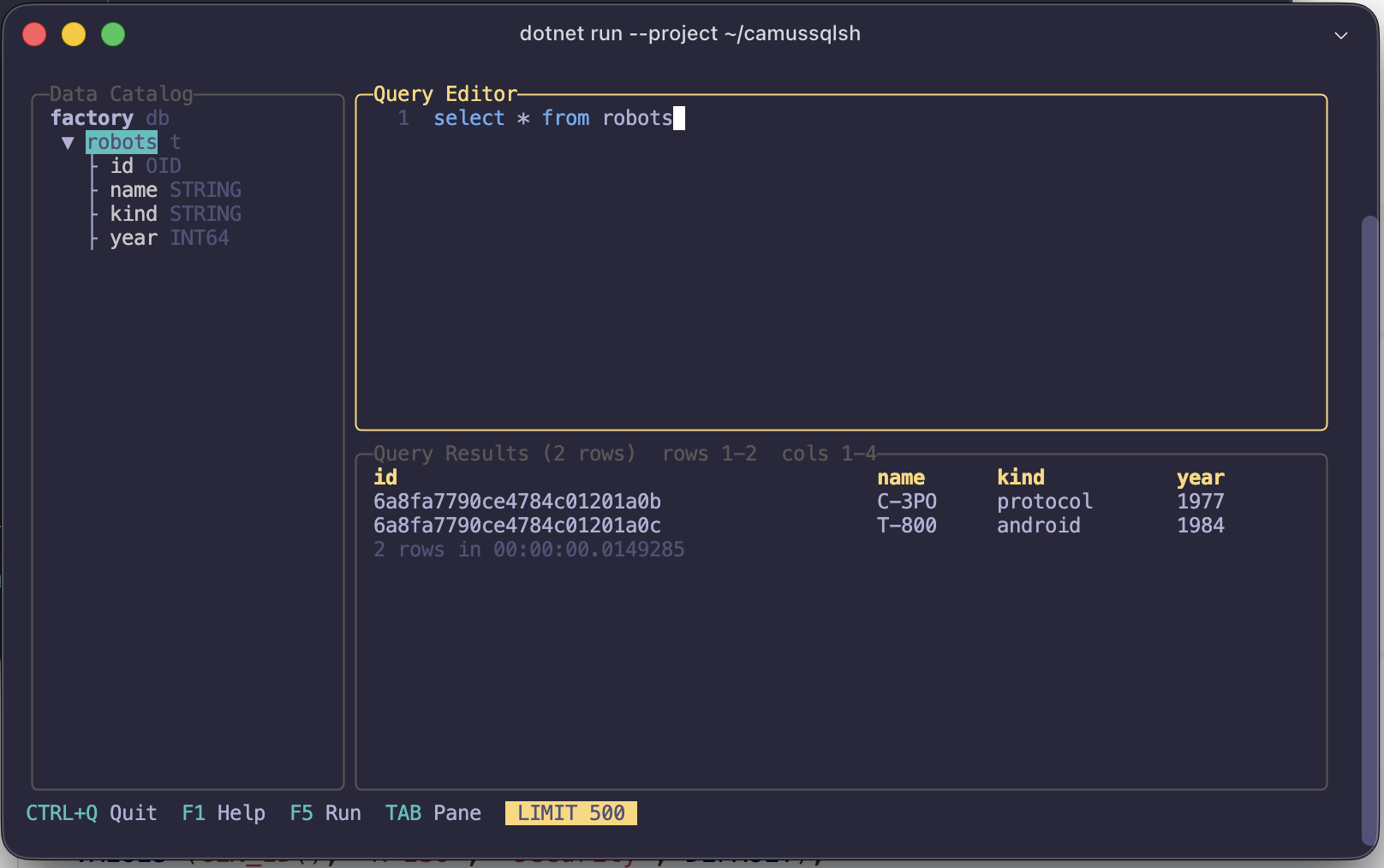
Use --tui when you want the catalog, editor, and results visible at the same
time:
camus-cli northwind --tui
camus-cli -c "Endpoint=http://localhost:5096;Database=northwind;Protocol=grpc" --tui
The screen has three panes:
| Pane | Purpose |
|---|---|
| Data Catalog | Lists tables in the current database. Expand a table to see its columns and types. |
| Query Editor | Holds SQL text with syntax coloring and completion. |
| Query Results | Shows the latest result grid and one log line for each statement that ran. |
Common keys:
| Key | Action |
|---|---|
Tab / Shift+Tab | Move between panes. |
F5 / Ctrl+R | Run every statement in the editor. |
Shift+Enter | Run the editor on terminals that support the disambiguating keyboard protocol; otherwise inserts a new line. |
Esc | Cancel the running query or close the help bar. |
F1 | Show or hide the key list. |
F2 | Turn the result row cap on or off. |
Ctrl+S | Save the editor text. |
Ctrl+L / Ctrl+U | Clear the editor. |
Ctrl+Q | Quit. |
The catalog pane uses Space to insert the selected name into the editor. The
editor pane uses Ctrl+N and Ctrl+P to move through completions because
Tab changes panes. The result pane supports Up, Down, PageUp,
PageDown, Left, Right, Home, and End for scrolling.
The result grid pages rows in chunks of 200. A display cap of 500 rows is on at
startup; press F2 to remove that display cap. The cap is not a SQL LIMIT.
The editor text is persisted between TUI sessions in the system temporary directory as:
camusdb.query.sql
Backup commands run at the prompt only. In --tui, they report an error.
The mode needs an ANSI terminal. If detection fails for a capable terminal, use
--force-rich or set CAMUS_FORCE_RICH=1.
Multiline input
The shell supports SQL over several lines. It continues to collect the input while the statement looks incomplete.
Current incomplete cases include:
- open single-quoted string
- open double-quoted string
- unmatched
( - trailing comma
Example:
select
  id,
  name
from users
where active = true;
The shell also divides several statements at a semicolon. It leaves a semicolon inside a quoted string untouched.
A paste of SQL over several lines also works. The editor turns each pasted
Enter key into a new line. It does not submit each line at its arrival.
Non-interactive execution
Use a -e, or an --execute, to run some SQL and exit. The shell starts no
prompt:
camus-cli northwind -e "SELECT * FROM users"
camus-cli -c "Endpoint=http://localhost:5096;Database=northwind;Protocol=grpc" -e "SHOW TABLES"
Several statements can run in one call. Separate them with a semicolon:
camus-cli demo -e "INSERT INTO users (id, name) VALUES (gen_id(), 'Ada'); SELECT * FROM users"
Vertical output also works:
camus-cli demo -e "SELECT * FROM users\G"
That mode helps in four places: a script, a job of a CI system, a job of cron, and a redirection of a shell:
camus-cli demo -e "SELECT * FROM users" > users.txt
Running a .sql file
Use a -f, or a --file, to run every statement of a file and exit. You can
therefore apply a schema, and a migration, without the interactive console:
camus-cli northwind -f schema.sql
camus-cli -c "Endpoint=http://localhost:5095;Database=northwind" -f seed.sql
A semicolon separates two statements. The statements run in order. The shell
handles a \G and a comment exactly as a source handles them inside the
shell.
The shell streams the file. Its size therefore does not matter.
The execution stops at the first statement that fails. The shell prints the
error, with the statement of the problem, and with the line of its start. The
other statements do not run. The process exits with the status 1.
Pass a - as the path. The shell then reads the script from the standard
input:
cat schema.sql | camus-cli northwind -f -

camus-cli northwind -f - <<'SQL'
create table users (id oid primary key, name string);
insert into users values (gen_id(), 'Ada');
SQL
A -f and a -e combine. The file runs first. A -e can therefore read back
what the file wrote:
camus-cli demo -f seed.sql -e "select count(*) from users"
Prepared statements
The driver registers a statement with the server, after it sees the same text of SQL a few times. It runs that statement in its prepared form after that moment.
You enable nothing. A prepared execution returns exactly the result of an inline one.
show prepared reports the current registrations:
camus> show prepared
Prepared statements: 1 (MaxAutoPrepare=128, AutoPrepareMinUsages=2)
  prepared     select id from robots where year = 1984
(the statement you ran last)
Pass a statement to ask about that statement. The shell otherwise reports the last statement of your session:
show prepared select id from robots where year = 1984
\prepared is an alias of both forms.
A statement from the prompt usually reports as inline. It carries its values
inside the text of the SQL. Each execution is therefore a different text, and it
never repeats often enough for a registration.
The statements that reach a prepared form come from another source. A file of a
source, and an application, both repeat a statement verbatim.
The connection string holds both thresholds:
camus-cli -c "Endpoint=http://localhost:5095;Database=demo;MaxAutoPrepare=512;AutoPrepareMinUsages=1"
MaxAutoPrepare is the number of the statements that stay registered. A 0
turns the registration off.
AutoPrepareMinUsages is the number of the executions before a registration.
See Parameters And Prepared Statements.
Backups
The family of the backup commands drives two areas of the administration of
the server: the online backup, and the recovery to a point in time. Every
command of that family is safe while the server serves traffic.
backup full                            take a full backup
backup incremental <parent-backup-id>  chain an incremental onto a backup
backup coordinated                     take a cluster-wide consistent backup
backup list                            list the node's backup catalog
backup chain <leaf-backup-id>          resolve and validate a restore chain
backup gc preview                      report what retention would reclaim
backup gc                              run retention now
A backup on its own prints that list. A backup help prints it as well.
A typical session has three steps. It takes a full backup. It adds an incremental backup onto that chain. It then checks that the chain would truly restore:
camus> backup full
    Backup Id: 971a0a88-3d36-42c6-b36b-8d1e773f40c4
         Type: Full
Created (UTC): 2026-08-10 03:45:47
       Parent: (none)
   Partitions: 4
Backup OK (00:00:03.117)

camus> backup incremental 971a0a88-3d36-42c6-b36b-8d1e773f40c4
camus> backup chain 719b7b6b-281d-4979-bf63-b495a7d1bdaf
backup chain is the read that validates. CamusDB rejects a chain that it
cannot assemble here, and not at the time of a restore. The command therefore
answers one question: would this backup truly restore?
It prints the chain, with the root first. It prints the recoverable window below that chain. A restore to a point in time may target that window.
Things worth knowing:
- Backups are node-wide, not per-database. Every database on the server shares one storage node. Nothing here is scoped to the current database, and the commands work with no database selected.
- The server must opt in. Backups are off until
kahuna.backup_diris set; until then every command fails withCADB0700 BackupNotConfigured. - A superuser only. While the authentication is enabled, connect as a superuser,
with a
-uor a--token. While the authentication is disabled, the server limits this surface to a caller on loopback. It therefore refuses a remote shell. It does not permit a backup of a whole node without an identity. - An incremental can become a full. If the parent has aged past the retention floor, the server takes a full backup instead. The command still succeeds and reports the substitution and its reason.
backup coordinatedmust reach the coordinator. Any other node refuses withCADB070E BackupNotCoordinator. PinBackupEndpoint=to the coordinator whenEndpoint=names a multi-node pool.- The API uses REST only. It has no form in SQL, and it has no service of gRPC.
The shell points its default connection of gRPC at the known port of HTTP for
you. Against a
-cconnection string with an explicitProtocol=grpc, add aBackupEndpoint=. That key names the endpoint of HTTP of the server. - Backup requests use their own timeout.
BackupTimeout=in the connection string, 300 seconds by default, rather than the statement timeout, because a full backup copies a whole node's base image.
The retention runs automatically after each backup. It also runs on a periodic
tick. You therefore need a backup gc for one purpose: an immediate reclamation
of the space, after a change to a tighter limit.
Preview the pass first. A preview deletes nothing:
camus> backup gc preview
Retention preview: 2 backups, 0 orphans, 1.41 GB would reclaim (00:00:00.041)
The restore is not part of this family. A restore builds into a fresh root of the data. An operator then stops the server, and starts a new server against that root.
There is no hot restore in place. A restore therefore stays a step of the runbook of an operator. The shell cannot drive it to its end. See Backup And Restore.
History
The shell loads the history of the commands automatically. It saves that history automatically as well.
History file:
camusdb.history.json
The shell stores the file under the temporary directory of the system.
The current source gives this behavior:
- history is loaded on startup
- history is saved on normal exit
- history is also saved on
Ctrl+C - adjacent duplicate entries are removed
- statements that inline passwords with
IDENTIFIED ... BY ...are kept out of the on-disk history file
Keyboard shortcuts
The rich editor supports these features:
| Key | Action |
|---|---|
Enter | Submit the current statement. |
Shift+Enter | Insert a new line. |
Up / Down | Navigate lines or command history. |
Left / Right | Move the cursor. |
Ctrl+Left / Ctrl+Right | Move by word. |
Home / End | Jump within the current line. |
PageUp / PageDown | Jump to first or last multiline line. |
Backspace / Delete | Delete text. |
Tab | Autocomplete the current word. |
Ctrl+Tab | Cycle to the previous completion. |
SQL execution
camus-cli routes a statement by its shape:
- query statements are shown as result tables
- DDL prints
Query OK - inserts, updates, and deletes print affected row counts
Queries include:
select * from users;
select * from users where year >= 1980;
explain select * from users;
explain (logical) select * from users;
explain (physical) select * from users;
explain (analyze) select * from users;
show tables;
desc users;
describe users;
show databases;
show variables;
show variables like 'query_result_cache_%';
show cluster settings;
show columns from users;
describe indexes from users;
show branches from app;
show ancestors from app_test;
DDL includes:
create database app;
create database if not exists app;
show databases;
rename database app to app_prod;
drop database if exists app_prod;
create database app_test branch from app_prod;

create table users (
  id oid primary key not null,
  name string not null
);

create table inactive_users as
select id as old_id, name
from users
where active = false;

create index users_name_idx on users (name);
alter table users add column active bool default (true);
alter table users rename column name to display_name;
alter table users rename to app_users;
alter table app_users add constraint active_check check (active is not null);
truncate table app_users;
drop table users;

set cluster setting max_mutations_per_transaction = 40000;
reset cluster setting max_mutations_per_transaction;
Mutations include:
insert into users (id, name) values (gen_id(), 'Ada');
insert into archived_users (id, name)
select id, name from users where active = false;
update users set name = 'A. Lovelace' where id = '...';
delete from users where name = 'A. Lovelace';
Vertical output
End a query with a \G instead of a ;. The shell then prints each row
vertically. That form helps with a wide row, with a long value of JSON, and with
a command of an inspection that has many columns.
select * from users\G
Example shape:
*************************** 1. row ***************************
  id: 6a3dd713d615ae230488d7f2
name: Ada
1 rows in set (00:00:00.0123456)
A \G also works inside a file of a source. It works inside a batch of
several statements as well.
Transactions
The shell holds explicit commands of a transaction:
begin;
commit;
rollback;
It also knows these forms:
start transaction;
The current implementation gives these rules:
- only one active transaction is allowed at a time
commitwith no active transaction shows an errorrollbackwith no active transaction shows an error- after
commitorrollback, the shell clears its local transaction state - on
Ctrl+C, an active transaction is rolled back before exit
Syntax highlighting
The interactive editor highlights these parts:
- SQL keywords
- built-in shell commands
- booleans
- quoted strings
- numeric literals
- supported function names
The shell holds the list of the keywords and of the functions inside itself. That list therefore follows the colors of the CLI. It does not affect the support of the SQL on the server.
The current highlighter holds the newer types, keywords, system statements, and
maintenance statements of CamusSQL. Examples are UUID, GUID, BYTES,
BLOB, DATE, DATETIME, TIMESTAMP, ARRAY, DATABASES, BRANCH,
BRANCHES, ANCESTORS, ISOLATION LEVEL, READ COMMITTED, SERIALIZABLE,
SHOW VARIABLES, SHOW ENGINE STATS, SHOW STATISTICS FOR,
SET CLUSTER SETTING, RESET CLUSTER SETTING, TRUNCATE, and WITH NO DATA.
It also highlights line and block comments:
-- one-line comment
/* block comment */
select gen_uuid_v7(), now();
Autocompletion
Press Tab to complete the word under the cursor. Press Tab again to move
forward through the matches. Press Ctrl+Tab to move backward.
The completion knows its context. These positions expect the name of a relation:
from, into, update, join, table, view, desc, describe,
truncate, and the table position of show statistics for. After one of them,
the shell offers the names of the tables and of the views of the current
database.
At any other position, it offers a keyword of SQL, a function, a constant, and a command of the shell.
select * from us<Tab>
insert into <Tab>
show statistics for <Tab>
sel<Tab>
For runtime cluster settings, completion also offers configuration keys after
SET CLUSTER SETTING and RESET CLUSTER SETTING. The shell loads those names
from SHOW VARIABLES and omits restart-only keys from the completion list.
The shell loads the names of relations with three statements: SHOW TABLES,
SHOW VIEWS, and SHOW MATERIALIZED VIEWS.
It refreshes those names at its startup, and after a use <database>. It also
refreshes them after any statement that changes the set of the relations. Such a
statement is one of these:
- A
CREATE TABLE, or aDROP TABLE. - A
CREATE VIEW, aCREATE OR REPLACE VIEW, aDROP VIEW, or anALTER VIEW. - The equivalent form of any of those, for a materialized view.
Database switching
You can change the current database. You stay inside the shell:
use analytics;
use `order details`;
The command rewrites the active connection string. It replaces the part
Database=.... It then opens a new connection to that database.
The target database must exist already. A use creates no database.
The name can be bare. It can also carry backticks, or quotation marks. Use a quoted form for two kinds of name: a name that is the same as a keyword, and a name that holds a space.
The shell handles a use. The server does not. The command works in a file of a
script, with a -e, and at the prompt.
A dump can therefore change its database in the middle of a file. A session without a database can also select one, from its first statement.
Source files
Execute a file of a script of SQL:
source ./seed.sql
The shell streams the file. It does not read the file into the memory. A dump larger than the RAM therefore works. The first statement also runs immediately. It does not wait for a parse of the whole file.
The shell divides the statements at a semicolon. It ignores a semicolon inside any of these six forms:
- A string with single quotation marks.
- A string with double quotation marks.
- An identifier with backticks.
- A line comment of the form
--. - A line comment of the form
#. - A block comment.
It knows a repeated quotation mark, as in 'it''s'. It knows a backslash of an
escape as well. It removes a comment before it sends a statement to the server.
A statement with a \G at its end, inside a file of a source, uses the
vertical output.
The execution stops at the first statement that fails. The shell reports the file, and the line of the start of that statement.
Pass a --force to continue instead. The shell then prints a summary at the
end:
source ./seed.sql --force
An open transaction stops the file in both cases. The server aborted that transaction already. Every other statement would therefore fail as well.
A file may hold a use statement, and it can therefore change its database
during its run.
The shell refuses a use inside an open transaction. It stops the file. The
rest of that file would otherwise run against the wrong database.
Workload subcommand
The CLI also holds a helper for a workload:
camus-cli workload <init|run> <bank|northwind|factory|tpcc|tpcb> [options]
Supported workloads:
banknorthwindfactorytpcctpcb
Workload options:
| Option | Description |
|---|---|
-c, --connection-source | Connection string. |
--database | Target database. Default: demo. |
--rows | Rows to generate for init. Default: 1000. Accounts for bank and tpcb, warehouses for tpcc. |
--concurrency | Parallel workers for run, and parallel writers for init. Default: 64. |
--duration | Run duration in seconds. Default: 60. |
--locking | Transaction locking mode: optimistic or pessimistic. Default: optimistic. |
--isolation | Isolation level: serializable or read-committed. Default: serializable. |
--no-prepare | Run every statement inline instead of preparing it, to compare against the default prepared path. |
-u, --user | User to authenticate as. Also read from CAMUS_USER. |
-p, --password | Password for -u. Also read from CAMUS_PASSWORD. |
Examples:
camus-cli workload init bank --database demo --rows 5000
camus-cli workload run northwind --concurrency 5 --duration 120
camus-cli workload init factory --database factory
camus-cli workload run factory --concurrency 4 --duration 120
camus-cli workload init tpcc --database tpcc --rows 1
camus-cli workload run tpcc --concurrency 4 --duration 120
camus-cli workload init tpcb --database tpcb --rows 10000
camus-cli workload run tpcb --concurrency 8 --duration 120
Without a connection string, the command of the workload uses these defaults:
Endpoint=http://localhost:5096;Database=demo;Protocol=grpc
Endpoint=http://localhost:5095;Database=demo;Protocol=rest
A -c, or a --connection-source, can hold no Database=.... The command of
the workload then adds the value of the --database.
A workload tries gRPC first, and REST second, like the interactive shell. A
Protocol=... in the connection string stops that behavior.
A workload also sets a wider default timeout of a command. A commit of a batch needs that time.
Terminal detection
The rich editor turns on under three conditions. The terminal reports a support of ANSI. The input is interactive. The output goes to a terminal.
The shell can fail to detect a capable terminal. Use the flag of the diagnosis in that case:
camus-cli --diagnose-terminal
Force the rich editor, when you know that your terminal supports it:
camus-cli --force-rich
or persistently:
export CAMUS_FORCE_RICH=1
Connection validation
The shell validates the connection string before it opens a connection. That string must hold these parts:
- a valid absolute
Endpoint
The shell also sends a first ping. The startup therefore fails early, when it cannot reach the target node.
Without a selected database, run a CREATE DATABASE ..., or a use <database>.
Do that before any work at the level of a table.
When to use it
Use camus-cli for these purposes:
- a quick interactive SQL session
- easy local development against a CamusDB node
- script execution from
.sqlfiles, interactively or with-f - manual transaction testing
- taking and inspecting backups without writing HTTP calls by hand
- lightweight workload bootstrapping for demos and experiments
For an integration with an application, see .NET Driver and EF Core Provider.