Web Console
The CamusDB Web Console is a browser workspace for using and operating CamusDB.
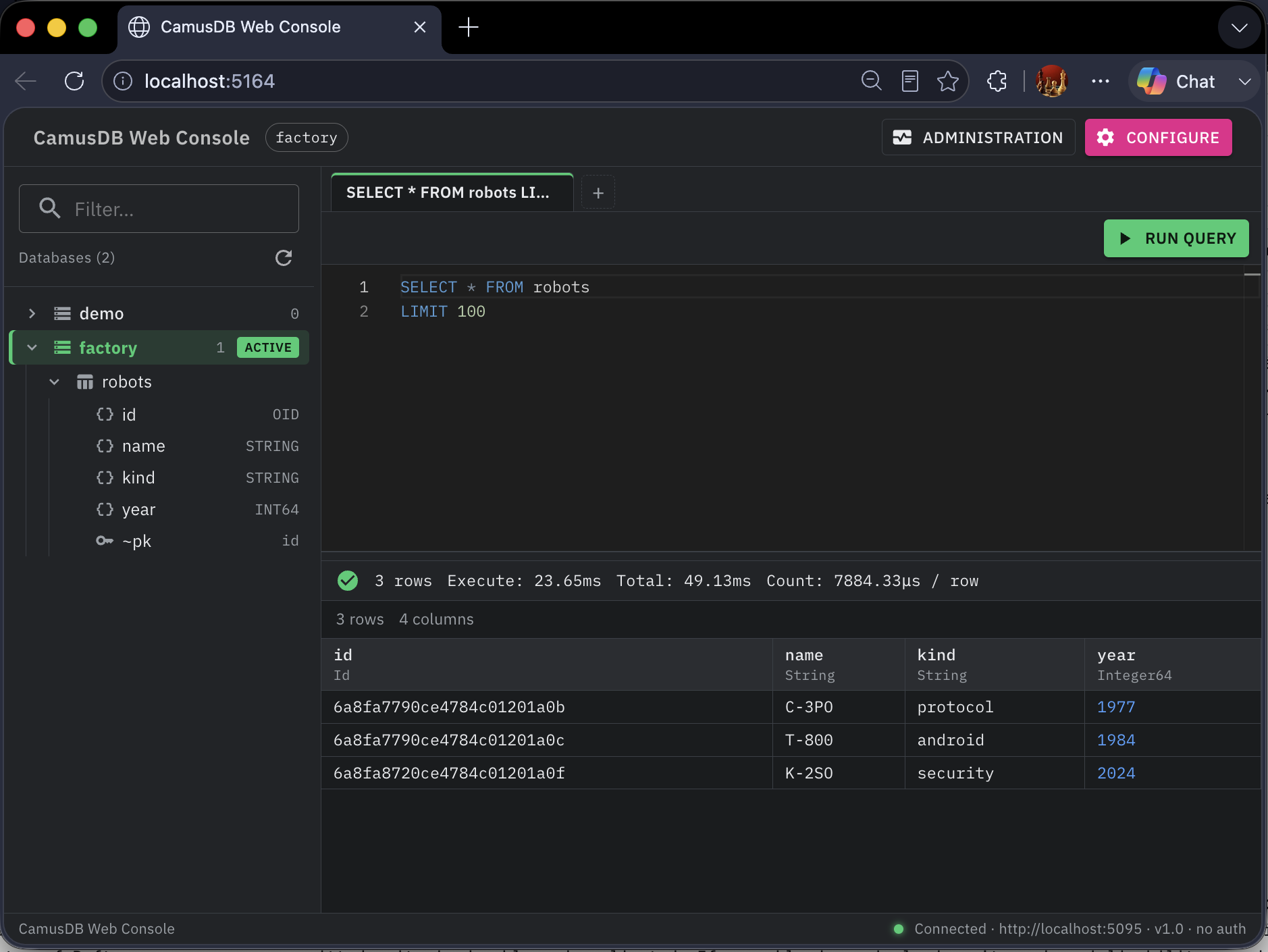
Use it when you want a graphical workspace. It lets you browse schemas, run SQL, inspect results, edit small result sets, export tables, view node configuration and engine metrics, and administer backups from a browser.
Requirements
- A CamusDB server that runs.
- Docker.
CamusDB exposes REST on the port 5095 by default. It exposes the gRPC of a
client on the port 5096. The Web Console can use either protocol.
Run it with Docker
The Docker image contains everything needed to run the console:
docker run --rm -p 8080:8080 \
  -e CamusDB__Endpoint=http://host.docker.internal:5095 \
  -e CamusDB__Database=demo \
  camusdb/camusdb-webconsole:latest
Open this address:
http://localhost:8080
host.docker.internal reaches CamusDB on the host machine, with Docker Desktop.
A host with Linux may not provide that name of the DNS. Use the LAN IP of the
host in that case. You can also add this option:
--add-host=host.docker.internal:host-gateway
At the first load, the console uses its configured defaults. Use the Configure control of the app bar to change the endpoint, database, protocol, backup endpoint, timeout, maximum rows, and credentials for the current browser session.
Configuration
The Web Console reads the CamusDB section of the configuration. In a
container, set the same keys as environment variables with two underscores.
| Setting | Environment variable | Description |
|---|---|---|
Endpoint | CamusDB__Endpoint | The base URL of CamusDB. Use the port of REST for rest. Use the port of gRPC for grpc. |
Database | CamusDB__Database | The name of the database of the session. |
Protocol | CamusDB__Protocol | It is rest by default. It also accepts grpc. |
TimeoutSeconds | CamusDB__TimeoutSeconds | The timeout of a request. |
MaxRows | CamusDB__MaxRows | The maximum number of rows that the console materializes into the grid of the results. |
User | CamusDB__User | The user of the authentication. An empty value means no authentication. |
Password | CamusDB__Password | The password of the User. |
AccessToken | CamusDB__AccessToken | A bearer token from another source. The console uses it instead of a login. |
LockEndpoint | CamusDB__LockEndpoint | Prevent browser sessions and vendor launch payloads from changing the configured endpoint or protocol. |
TokenLifetimeSeconds | CamusDB__TokenLifetimeSeconds | The fallback window for the reuse of a token, when the server reports no expiry. |
BackupEndpoint | CamusDB__BackupEndpoint | Optional REST endpoint for backup administration. Use it when the main protocol is gRPC, or when the main endpoint is a pool and backups must target one node. |
BackupTimeoutSeconds | CamusDB__BackupTimeoutSeconds | Optional timeout for backup administration calls. 0 uses the client default. |
Here is an example:
{
  "CamusDB": {
    "Endpoint": "http://localhost:5095",
    "Database": "test",
    "Protocol": "rest",
    "TimeoutSeconds": 30,
    "MaxRows": 1000,
    "User": "",
    "Password": "",
    "AccessToken": "",
    "LockEndpoint": false,
    "TokenLifetimeSeconds": 0,
    "BackupEndpoint": "",
    "BackupTimeoutSeconds": 0
  }
}
A Protocol=grpc needs an Endpoint at the listener of gRPC. That address is
usually http://localhost:5096.
Set LockEndpoint to true when the console is reachable beyond localhost and
users should not be able to repoint the server process at another CamusDB
endpoint. The same lock also applies to vendor-launched sessions.
Backup administration uses CamusDB's REST backup API. If the console connects
to CamusDB through gRPC, set BackupEndpoint to the HTTP/REST endpoint. If the
main Endpoint is a comma-separated pool of nodes, set BackupEndpoint to the
specific node that should receive backup commands. A coordinated backup must
reach the backup coordinator.
Authentication
The authentication of CamusDB is off by default. Without a configured
credential, the Web Console sends no Authorization header.
A server can start with CAMUSDB_AUTH_ENABLED=true. Sign in through the
Configure control of the app bar, in one of two ways:
- With a user and a password.
- With an access token from another source.
The console exchanges the password one time, for a bearer token with a short life. A later statement sends the token. It does not send the password.
When the console has a password, it can renew a token before it expires. It can also sign in again if the server rejects a token early.
Note this behavior of a session:
- A credential from the Configure control belongs to one browser session.
- The console does not put the password of a session into the connection string.
- The console remembers the name of the user in
localStorage. It uses that name to fill the dialog. - The console does not store the password in
localStorage. - The identity chip of the app bar holds a control to sign out. That control revokes a token that the console created. It then drops the connection.
- The console forgets a token that you supplied, at the sign-out. It does not revoke that token, because it did not create the token.
- The console cannot renew a token that you supplied.
You can also configure a User, a Password, or an AccessToken. Put the
value in appsettings.json, or in a CamusDB__* environment variable. The
console then signs in automatically. Prefer an environment variable, or a store
of secrets, to a password inside a commit.
Manage the users and the grants with SQL, from a session of a superuser:
CREATE USER app IDENTIFIED BY 'app-password';
GRANT SELECT, INSERT ON app_db.* TO app;
SHOW GRANTS FOR app;
A user without a SELECT on a table still sees the name of that table in the
tree of the schema. The tree shows that the columns are unavailable, because
that user lacks the privilege.
TLS
While authentication is enabled, CamusDB refuses a request with a credential over plaintext. A request from loopback is the exception.
A local development over http://localhost therefore works without a
certificate. For a deployment outside loopback, point the console at a CamusDB
endpoint with https://.
TLS can terminate before a request reaches CamusDB. Keep that plaintext hop
inside the boundary of your trust. Then configure CamusDB with
--require-tls-when-auth-enabled false.
The errors of the authentication
| Code | Meaning |
|---|---|
CADB0516 | The authentication failed. The credentials are absent, invalid, expired, or rejected. |
CADB0517 | The caller is authenticated. It lacks a privilege that the statement needs. |
CADB0518 | There are too many attempts of a login, for that account. |
CADB0519 | A client sent a credential over plaintext, where CamusDB requires TLS. |
Vendor Launch
An external product can open the console with its own branding and a CamusDB access token that the user's browser never sees. This is useful when another application already authenticates users and wants to offer a database console inside that workflow.
The launch surface is off by default:
{
  "ConsoleLaunch": {
    "Enabled": false,
    "ApiKey": "",
    "RequireHttps": true,
    "CodeLifetimeSeconds": 60,
    "SessionLifetimeMinutes": 60,
    "DefaultBrandName": "CamusDB Web Console",
    "MaxLiveEntries": 2000,
    "AllowedEndpoints": [],
    "PublicBaseUrl": ""
  }
}
| Setting | Environment variable | Description |
|---|---|---|
Enabled | ConsoleLaunch__Enabled | Enables the vendor launch endpoints. Disabled endpoints answer like ordinary missing routes. |
ApiKey | ConsoleLaunch__ApiKey | Shared key sent as X-Console-Key. It must be at least 32 characters when launch is enabled. |
RequireHttps | ConsoleLaunch__RequireHttps | Refuse to mint launch links over plaintext. Keep true unless TLS terminates before the console. |
CodeLifetimeSeconds | ConsoleLaunch__CodeLifetimeSeconds | Lifetime of the single-use redirect code. |
SessionLifetimeMinutes | ConsoleLaunch__SessionLifetimeMinutes | Lifetime of the launched browser session. |
DefaultBrandName | ConsoleLaunch__DefaultBrandName | Name shown when no vendor launch is active. |
MaxLiveEntries | ConsoleLaunch__MaxLiveEntries | Cap for live launch codes, sessions, and handoffs. At the cap, new launches fail closed. |
AllowedEndpoints | ConsoleLaunch__AllowedEndpoints | Optional allowlist for CamusDB endpoints accepted from launch payloads. |
PublicBaseUrl | ConsoleLaunch__PublicBaseUrl | Absolute public console URL used to build returned launch links. |
Generate ConsoleLaunch__ApiKey with a cryptographically secure source, for
example:
openssl rand -base64 32
The flow has two steps:
- The vendor backend calls
POST /api/console/sessionswithX-Console-Keyand a JSON payload. - The vendor redirects the browser to the returned
launchUrl.
Example backend call:
curl -X POST https://console.example.com/api/console/sessions \
  -H "X-Console-Key: $CONSOLE_KEY" \
  -H "Content-Type: application/json" \
  -d '{
        "brandName": "Acme Data Console",
        "accessToken": "<camusdb-access-token>",
        "database": "analytics"
      }'
The response contains a single-use URL:
{
  "launchUrl": "https://console.example.com/console/launch?code=...",
  "expiresInSeconds": 60
}
The token moves only from the vendor backend to the console backend. It is not
put in the URL, page HTML, localStorage, or JavaScript-readable state. The
browser receives an opaque session cookie.
brandName is validated before it is shown. It allows common letters, digits,
spaces, and punctuation such as -_.,&'()+, up to 64 characters. Control
characters, path separators, angle brackets, quotes, backticks, and emoji are
rejected.
Endpoint Safety
A launch payload may include endpoint and protocol. The console process
opens that endpoint, so allowing arbitrary values can let a caller make the
console reach internal hosts. Use one of these controls for any deployed
console:
- Set
CamusDB__LockEndpoint=trueto reject endpoint overrides. - Set
ConsoleLaunch__AllowedEndpointsto a comma-, semicolon-, or whitespace-separated allowlist.
Allowed endpoint entries can be full origins or host patterns without wildcards:
ConsoleLaunch__AllowedEndpoints="https://db.acme.example,db.internal.example:5095"
There is no wildcard syntax. Invalid entries fail startup instead of being silently skipped.
Features
The Web Console provides these features:
- A dark layout of a console. It holds an app bar, a sidebar of the schema, an editor of SQL, a grid of the results, and a footer of the connection.
- A dialog of the configuration. It covers the endpoint, the database, the protocol, the backup endpoint, the timeout, the cap of the rows, and the credentials.
- A browser of the schema. It uses
SHOW DATABASES,SHOW TABLES,SHOW COLUMNS FROM,SHOW INDEXES FROM, schema comments, and the metadata of a branch. - The Monaco editor of SQL.
- A highlight of the SQL of CamusDB, with a completion of a keyword and of a function.
- A button to run a query. Ctrl and Enter, or Cmd and Enter, also runs one.
- A run of only the selected SQL text. When text is selected, the run button
changes to
Run selection. - A workspace of queries, with several tabs.
- A run of a query that you can cancel.
- The times of the execution, and a bar of the status.
- A grid of the results that knows the types. It warns you at the cap of the rows.
- The actions of a context on a table, such as an edit of the data, a view of the data, an export of the table, and a delete of the table.
- The actions of an edit and of a delete of a row, when a result set belongs to the context of a table.
- An export of a table to CSV, and to JSON.
MaxRowscaps both. - Administration pages for node-local engine metrics, effective variables, and backup controls.
- The preferences of the interface that the console remembers, in the
localStorageof the browser. Examples include open SQL tabs, editor text, the active database, the user name, the schema drawer width, and the editor/results split.
Two clicks on a table of the tree of the schema insert this text:
SELECT * FROM table_name
LIMIT 100
Right-click a database to create a table or drop the database. Right-click a table to view or edit data, add an index, export the table, or drop the table. Dangerous actions require confirmation.
The behavior of a query
The console routes SQL by statement shape:
- Statements that return rows, such as
SELECT,SHOW,EXPLAIN, andWITH, render into the result grid. - DML and DDL statements render affected row counts and status messages.
- Database lifecycle actions in the schema browser run through the same database-level operations exposed by CamusDB.
The result grid materializes MaxRows rows at most. Keep that value reasonable
for a large table.
When part of the editor text is selected, the console executes only the selection. When nothing is selected, it executes the current tab.
The result grid styles values by type. It distinguishes NULL, numbers,
booleans, timestamps, blobs, UUIDs, and ordinary strings, and it warns when the
result was truncated by MaxRows.
Row Editing
Edit/View Data on a table opens a data tab. The tab runs SELECT * for that
table and attaches the table schema to the result, which enables row actions.
The edit dialog is generated from the table schema:
- Primary-key fields are read-only.
- Nullable fields get a
NULLtoggle. - Values are validated against the column type before the console builds the SQL statement.
UPDATEandDELETEuse the table primary key.
If a table has no primary key, edit and delete row actions are disabled with a
Primary key required hint. After a successful edit or delete, the data tab
refreshes its query.
Administration
The Administration page exposes node-local operational views:
| Panel | What it shows or does |
|---|---|
| Engine stats | Runs SHOW ENGINE STATS and displays the metrics of the node that answered. |
| Variables | Runs SHOW VARIABLES and displays effective configuration values for the node that answered. |
| Backups | Takes full, incremental, and coordinated backups; lists the backup catalog; validates a chain; previews or runs retention garbage collection. |
These views are node-local. They do not forward to a leader. To compare a cluster, point the console at each node.
When authentication is enabled, Administration requires a superuser. Engine metrics describe node-level workload, variables describe the node's security and runtime posture, and backups cover every database on the node.
Backups are available only when the server has backup configuration. See Backup And Restore for backup setup, retention, coordinated backups, and offline restore.
Export
An export of a table runs a SELECT * FROM <table>. The MaxRows of the
current session caps that statement. The console then downloads one of two
formats:
- CSV.
- JSON.
CSV uses proper quoting and escaping. JSON downloads an array of objects with dates as ISO-8601 strings, blobs as hex, and UUIDs in standard textual form.
The table can hold more rows than MaxRows. The export then reports that the
result was truncated.
For a full logical backup, and for a dump of SQL that you can restore, use camus-dump instead.
Notes
- The console uses the
SHOWstatements of SQL to browse a schema. - The console does not use the endpoints of a client for the metadata only.
- The console is a user interface for an operation. It is not a boundary of the authorization by itself. The authentication and the grants on the server of CamusDB remain the durable boundary of a permission.
- The console sends security headers that prevent framing, reduce MIME sniffing, and avoid leaking referrer details.
- Passwords and access tokens entered in the browser are not stored in
localStorage.